BioAlignCare At Home
BioAlign Care At Home

Everything your parent needs to live at home, in one place.

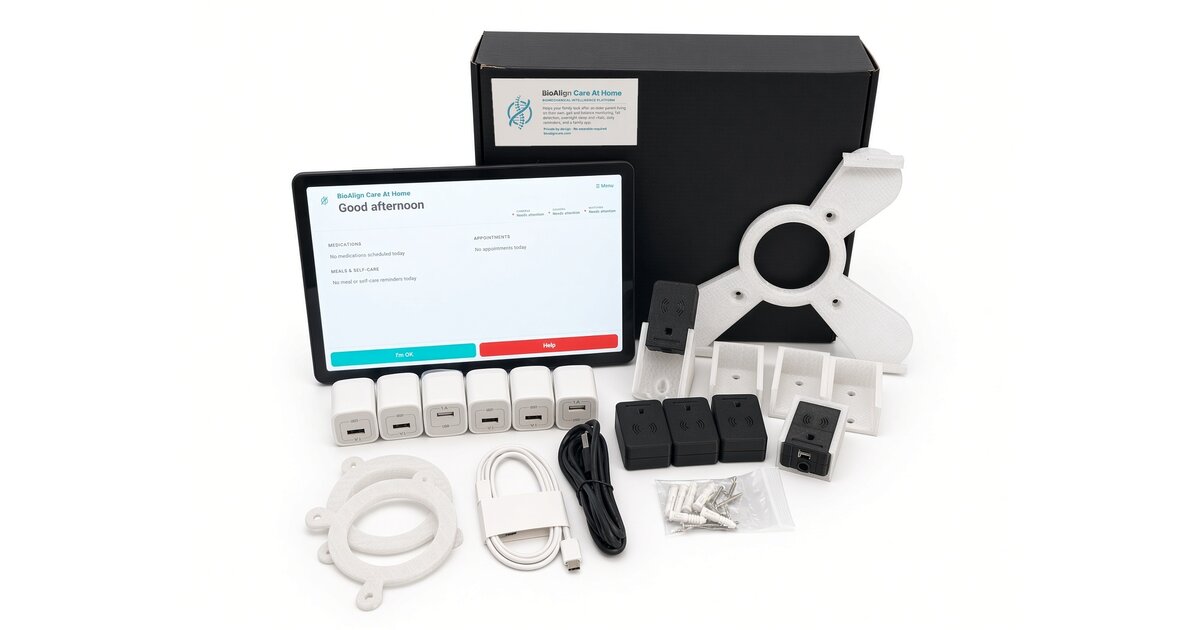
The BioAlign Care At Home kit: tablet, sensors, mounts and chargers

One platform for every part of aging at home, shared by the family, their caregivers and their doctor.

A tablet and a few small sensors keep track of your parent's blood pressure, weight and blood sugar, their medicines, meals and appointments, and how they sleep, walk and get around. It learns what's normal for them, watches for falls and calls for help, and lets the people who look after them know when something changes. No wearable required.

Read the install instructions — every step of setting it up.

Try it free for 14 days.

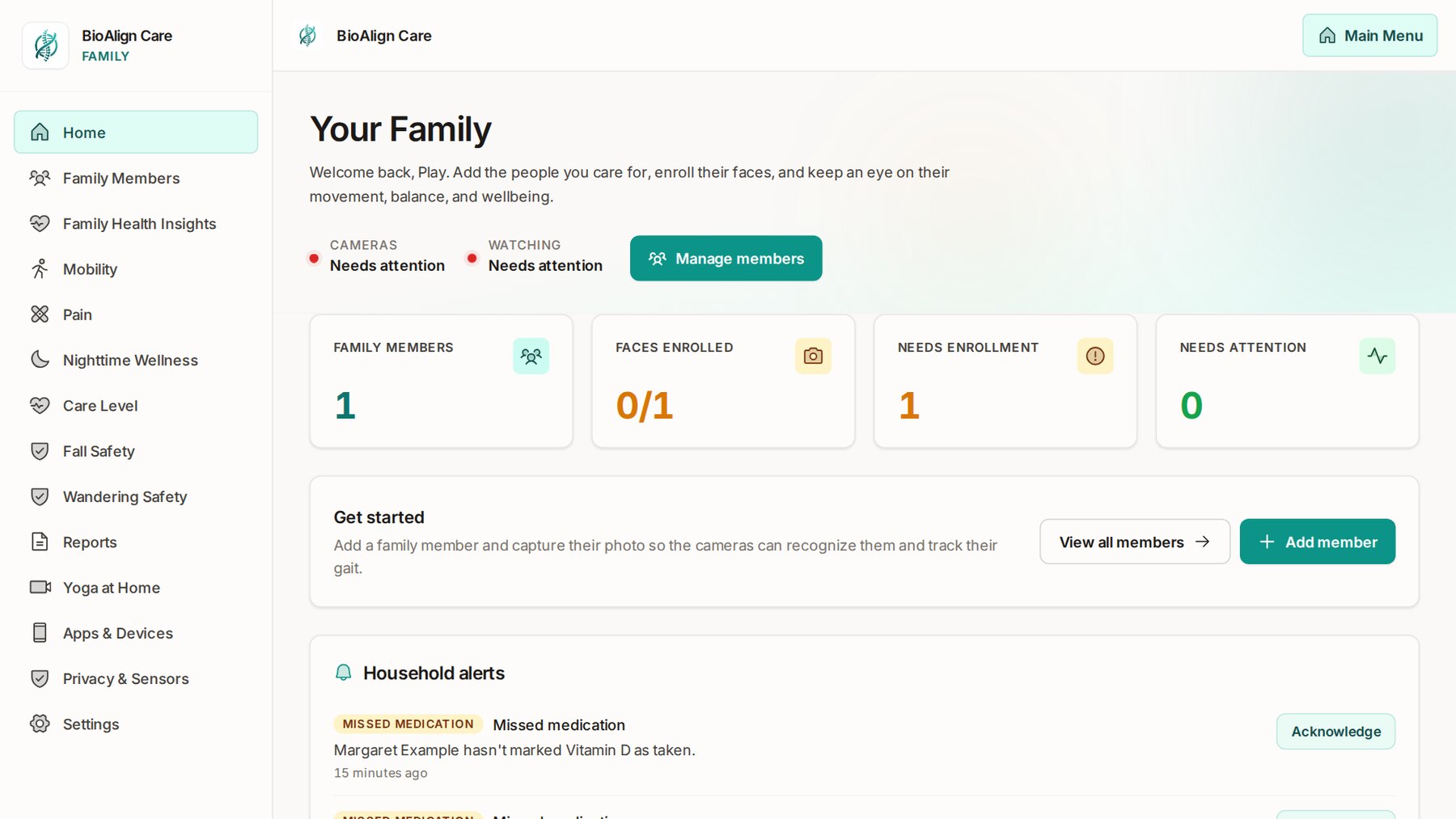
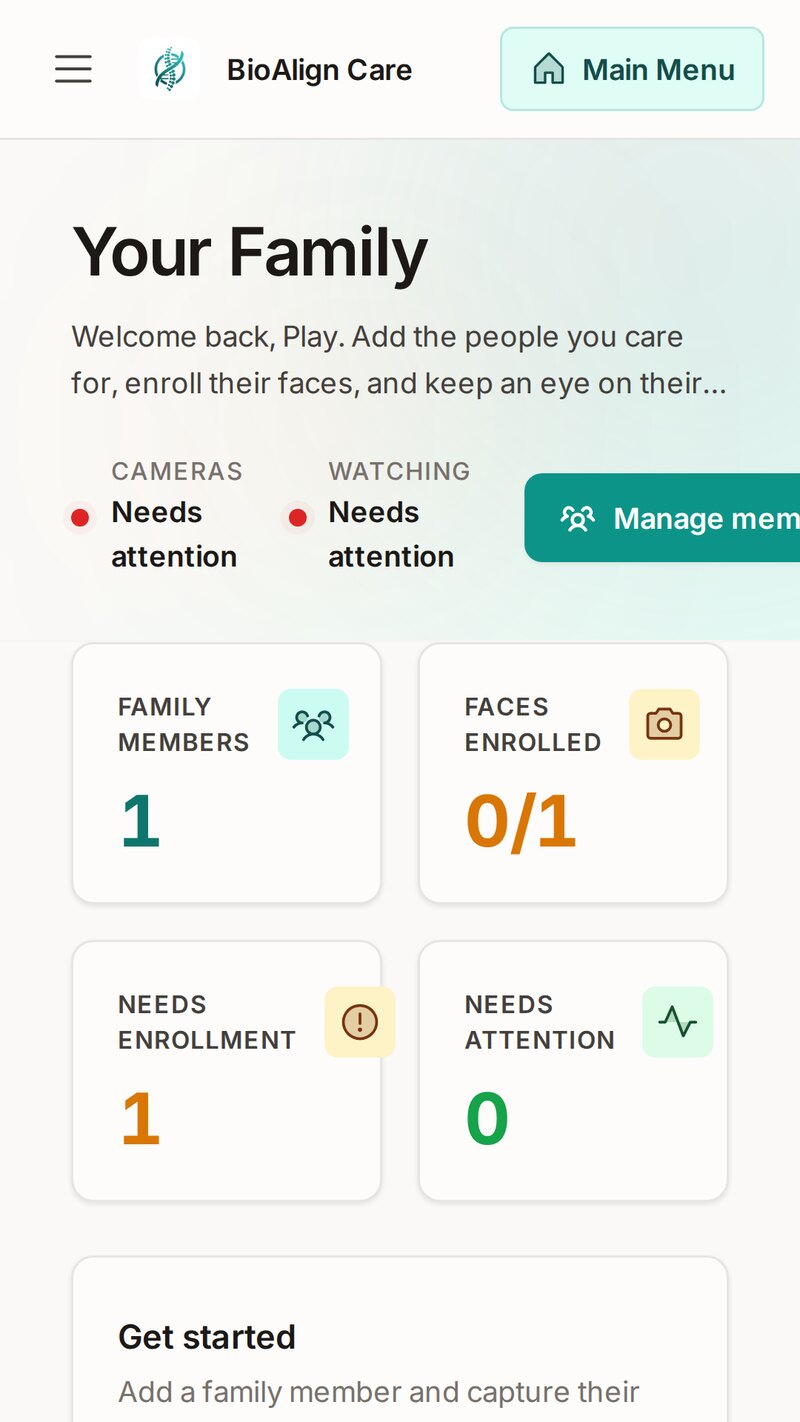
The family home screen: who's watched, faces enrolled, what needs attention and household alerts The same home screen in the family app on a phone
One platform

Not a drawer full of gadgets and apps.

Caring for a parent at home usually means piecing it together: a pill dispenser, a fall pendant, a camera, door sensors, a blood-pressure cuff, a sleep tracker. Each has its own app and its own bill, and none of them talk to each other or to the doctor. BioAlign Care At Home does all of it, in one place.

Vitals

Blood pressure, weight, blood sugar, oxygen, pulse and temperature, straight from Bluetooth devices.

Medicines

Reminders on the tablet, an "I took it" tap, and the family told when a dose is missed.

Meals and self-care

Gentle reminders through the day, at the times you set.

Appointments

On their screen in large type, and said out loud when it's time.

Sleep

Sleep, breathing and heart rate every night, with nothing to wear.

Activity

How much they're up and about, day by day, and when that changes.

Walking and posture

Gait, balance and posture, compared every day with their own normal.

Falls

Seen by the camera and ceiling radar, and on every family phone in seconds.

Help

A big Help button on the tablet and an optional SOS button they wear.

Doors at night

A quiet eye on the outside doors for a parent who may wander.

Health insights

A Functional-Health Index, a care level and plain-English observations.

Notes and reports

Care notes, a task list, and reports to share.

Everyone who looks after them, on the same page

Your parent

A simple app in large type: their reminders, an "I took it" tap and the Help button. Nothing to set up.

Family

The family app on every phone, wherever you live: alerts as they happen and how each person is doing.

Caregivers

Their own login: the day, sleep, vitals and falls, with care notes and a task list.

Their doctor

Their own login: health information over time, with room to leave notes for the family.

You choose who each person looks after. Caregivers and doctors never see the live camera.

Prevention

It learns what's normal for them, so changes don't go unnoticed.

Every day, the system quietly analyzes how your parent moves: how they walk, their speed, stride and steadiness, their posture, their balance, and how they get around the home. Nothing to wear, and nothing for them to do.

Over the first weeks it builds a baseline of what's normal for that one person. There's no generic chart; they're compared to themselves. When something starts to drift from their normal, like slower walking, a change in posture or less steady balance, it flags the risk early and the family sees it on the dashboard and on their phones.

That gives you time to act while it's still small: a doctor's visit, balance exercises, or Yoga at Home, before it turns into a fall or an injury.

  • Gait, posture, balance and mobility, analyzed every day
  • A baseline for each person: their own normal
  • Changes flagged early, so the family can act
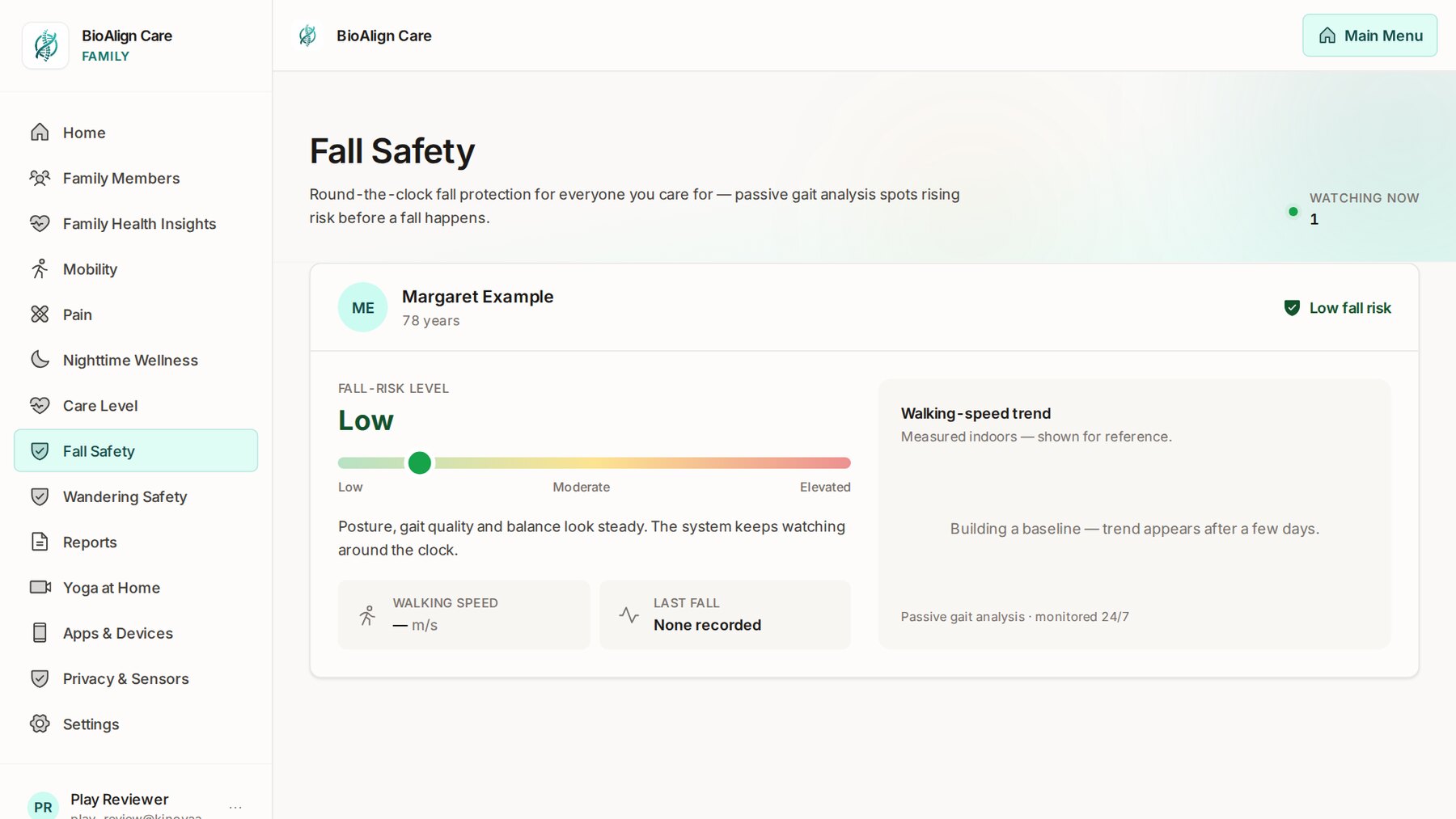
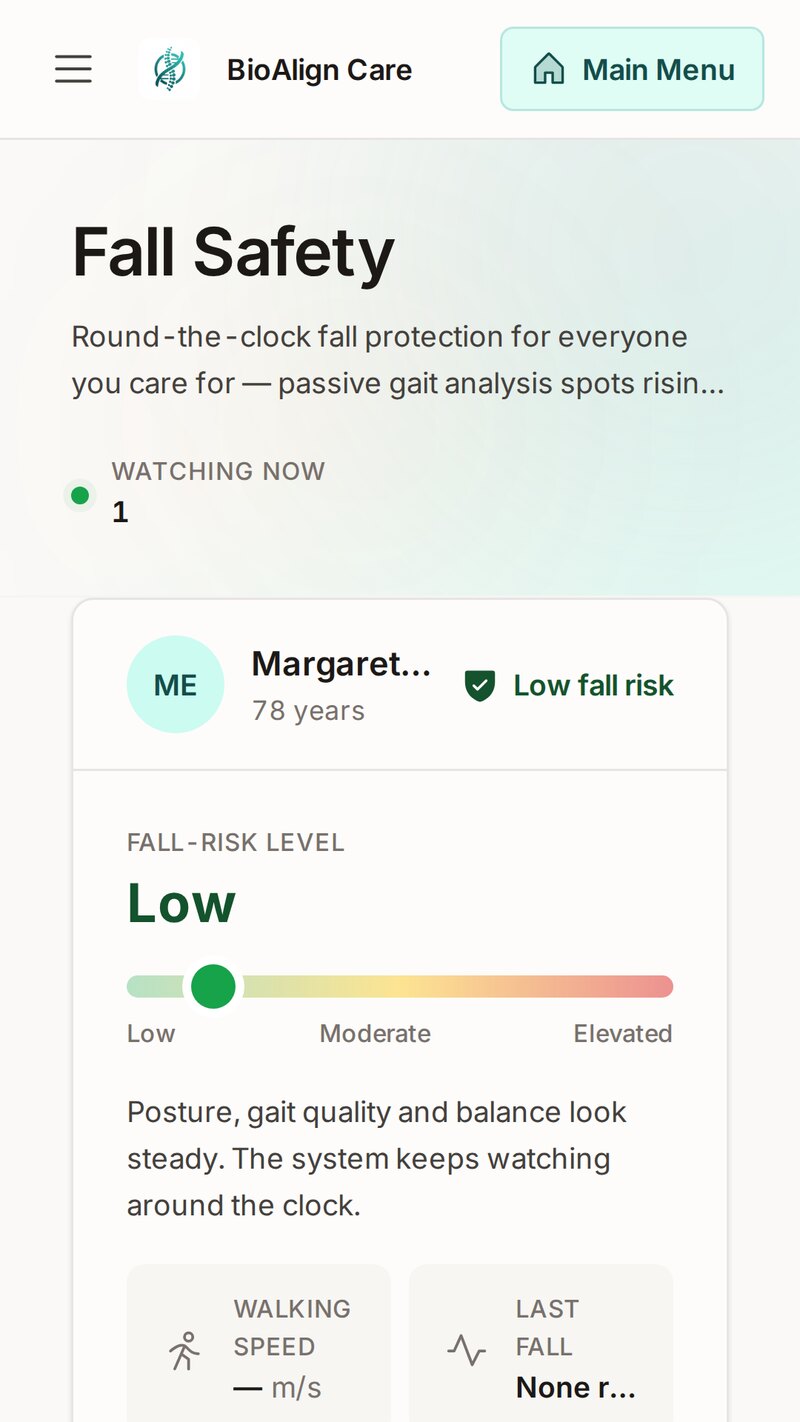
Fall Safety: fall-risk level, posture, gait and balance, and a baseline being built
Fall safety

If they fall, the family knows in seconds.

The tablet's camera watches the room it's in, and the fall sensors on the ceiling watch every room they're fitted in, including bedrooms and bathrooms where there is no camera at all. The moment a fall is seen, every family member gets an urgent alert on their phone. In the daytime the tablets in the home show it with a gentle chime; at night they stay dark and quiet so nobody is woken, and the family is still told straight away.

If nobody answers with "I'm OK" on the tablet within a minute, the family is alerted again, so a fall is never left unanswered. If two tablets see the same fall, the family is told once.

Between falls, the system keeps watching how they walk. The Fall Safety screen shows each person's fall-risk level — low, moderate or elevated — with their walking-speed trend and their last fall, so you can see change coming and act before it turns into a fall.

  • Camera and ceiling radar together, day and night
  • Urgent alerts to every family phone, day and night
  • No answer in a minute? The family is alerted again
Fall Safety: fall-risk level, posture and gait, walking speed and last fall
Help and alerts

Help is one press away, and every phone hears it.

There's a big Help button on the tablet. For the times they're not near it, a wearable SOS button on the wrist or as a pendant does the same thing from anywhere in the home: one press alerts the family straight away.

Every family member you invite gets the family app on their own phone. Urgent alerts — a fall, a call for help — break through straight away. Everyday ones arrive as normal notifications: a missed medication, someone out of bed for twenty minutes in the night, a sensor that's gone quiet, a tablet battery running low. Each alert can be acknowledged, so the family knows someone is on it.

  • Help button on the tablet and an optional wearable SOS button
  • Urgent alerts for falls and Help; everyday ones stay calm
  • Everyone in the family, on their own phone
The family app on a phone showing fall safety
Nighttime wellness

How they slept, without anything to wear.

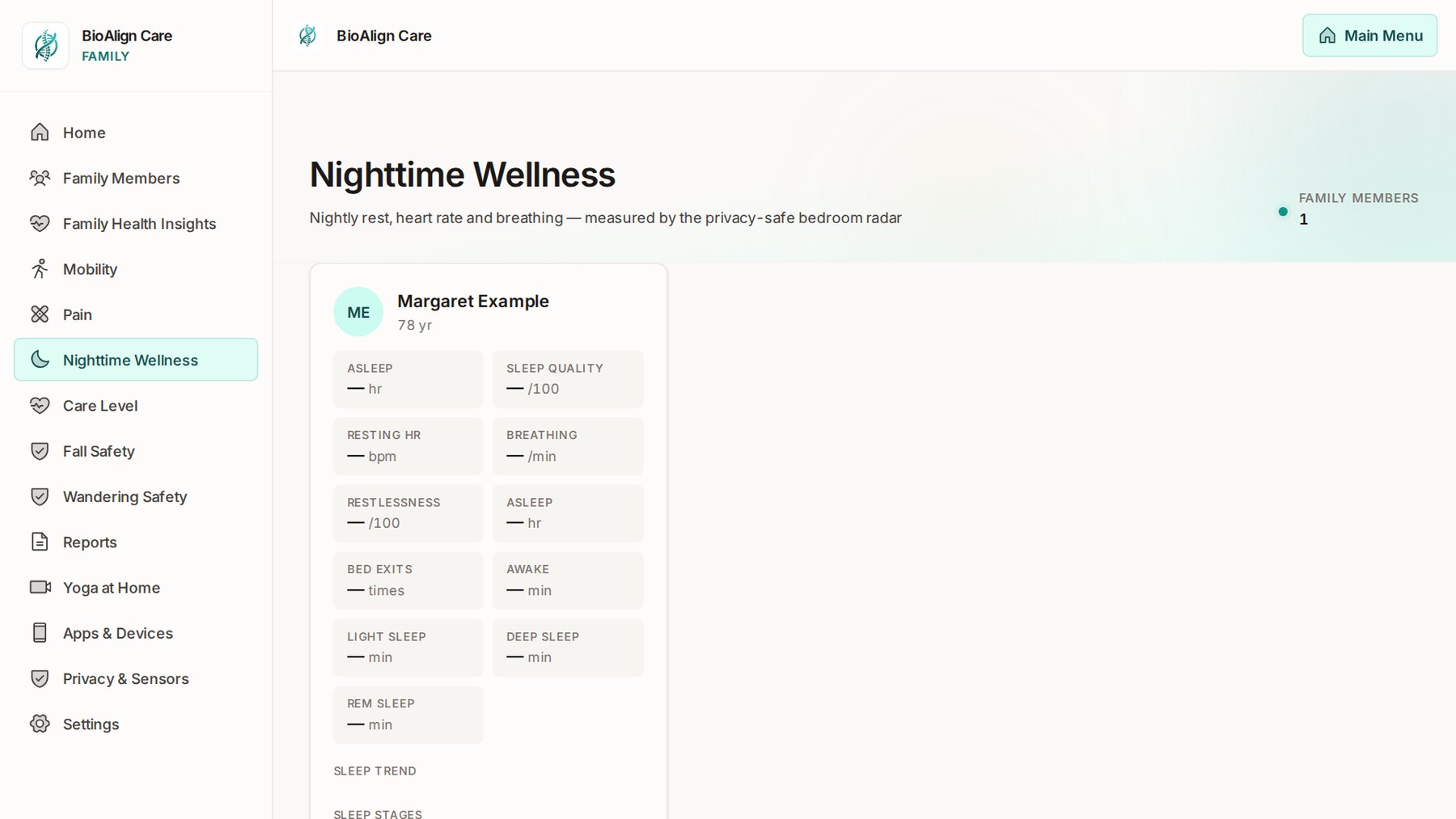
A small radar over the bed measures sleep, breathing and heart rate through the night, with nothing to put on, charge or remember. Each morning the Nighttime Wellness screen shows how the night went: how long they slept and how well, their resting heart rate and breathing, how restless they were, how long they lay awake, and how the night divided into light, deep and REM sleep.

Getting up in the night is normal and sends nothing. But if they've been out of bed for twenty minutes and haven't gone back, the family gets an alert to check on them.

  • Sleep, quality, heart rate and breathing every night
  • Light, deep and REM sleep and the trend over time
  • Out of bed twenty minutes at night? The family is told
Nighttime Wellness: asleep, sleep quality, resting heart rate, breathing, restlessness, awake time and sleep stages
Wellbeing

The bigger picture, in plain words.

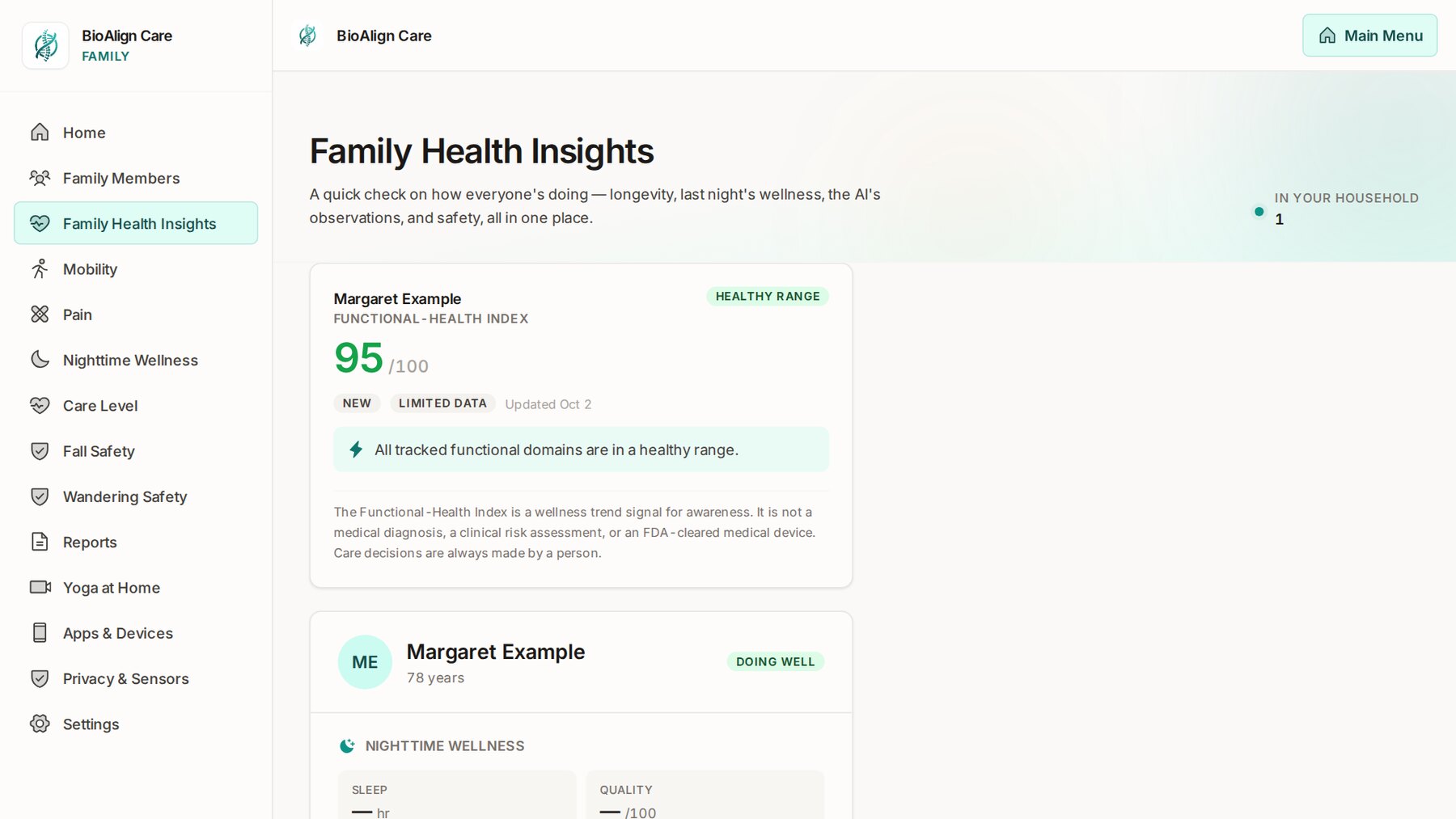
Day by day the system builds a picture of how each person is doing. Family Health Insights brings it together in one place: a Functional-Health Index out of 100, last night's sleep, safety, and short observations written in plain English — for example, that mobility has become the area most worth watching.

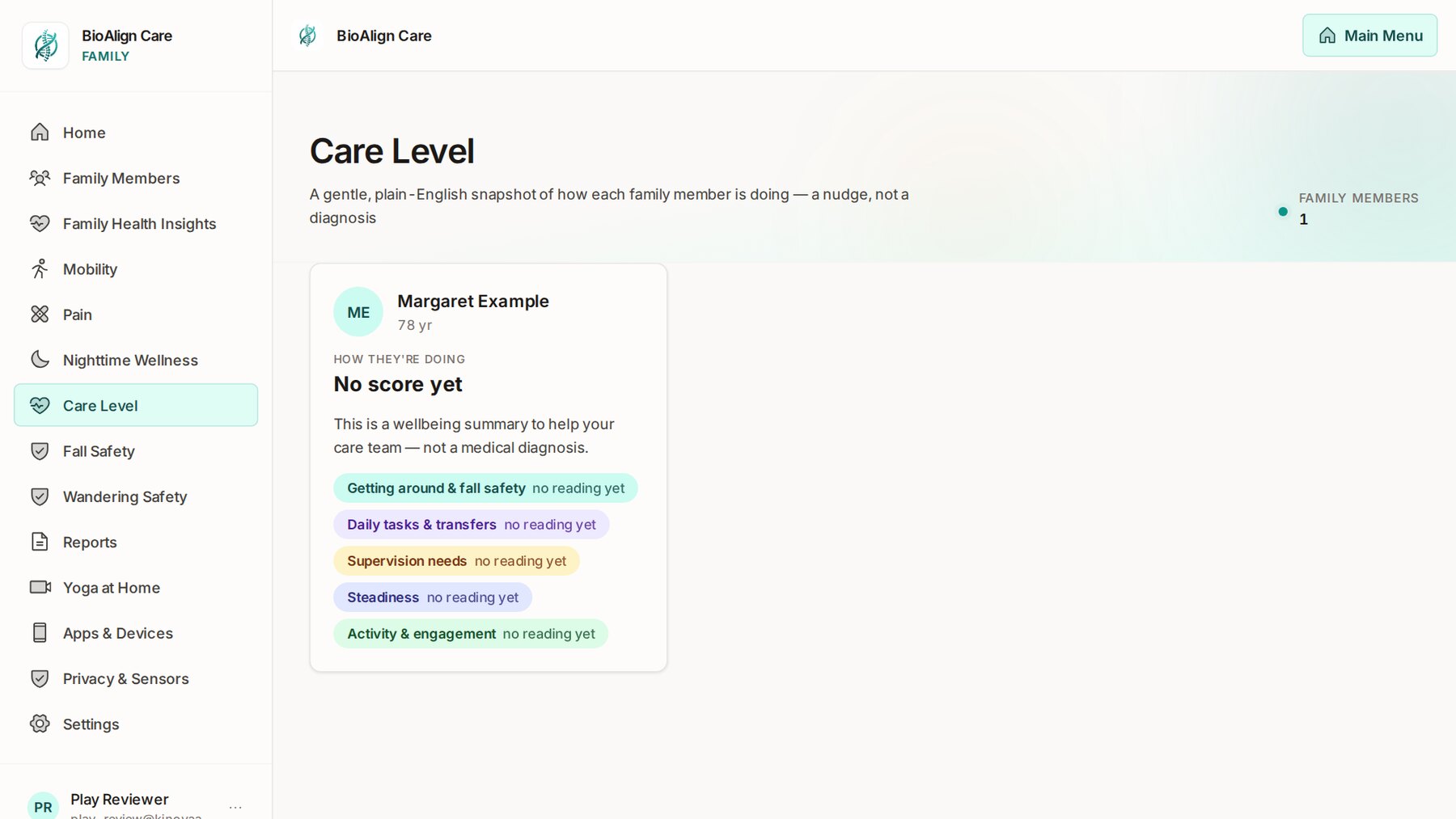
The Care Level screen is a gentle snapshot across five areas: getting around and fall safety, daily tasks and transfers, supervision needs, steadiness, and activity and engagement. It's there to help the family and anyone who helps with care see where things are heading, early.

  • Functional-Health Index with plain-English observations
  • Care level across five everyday areas
  • Mobility and balance checks any time, from the tablet
Family Health Insights: the Functional-Health Index and nighttime wellness Care Level: getting around, daily tasks, supervision, steadiness and activity
Wandering and doors

A quiet eye on the door at night.

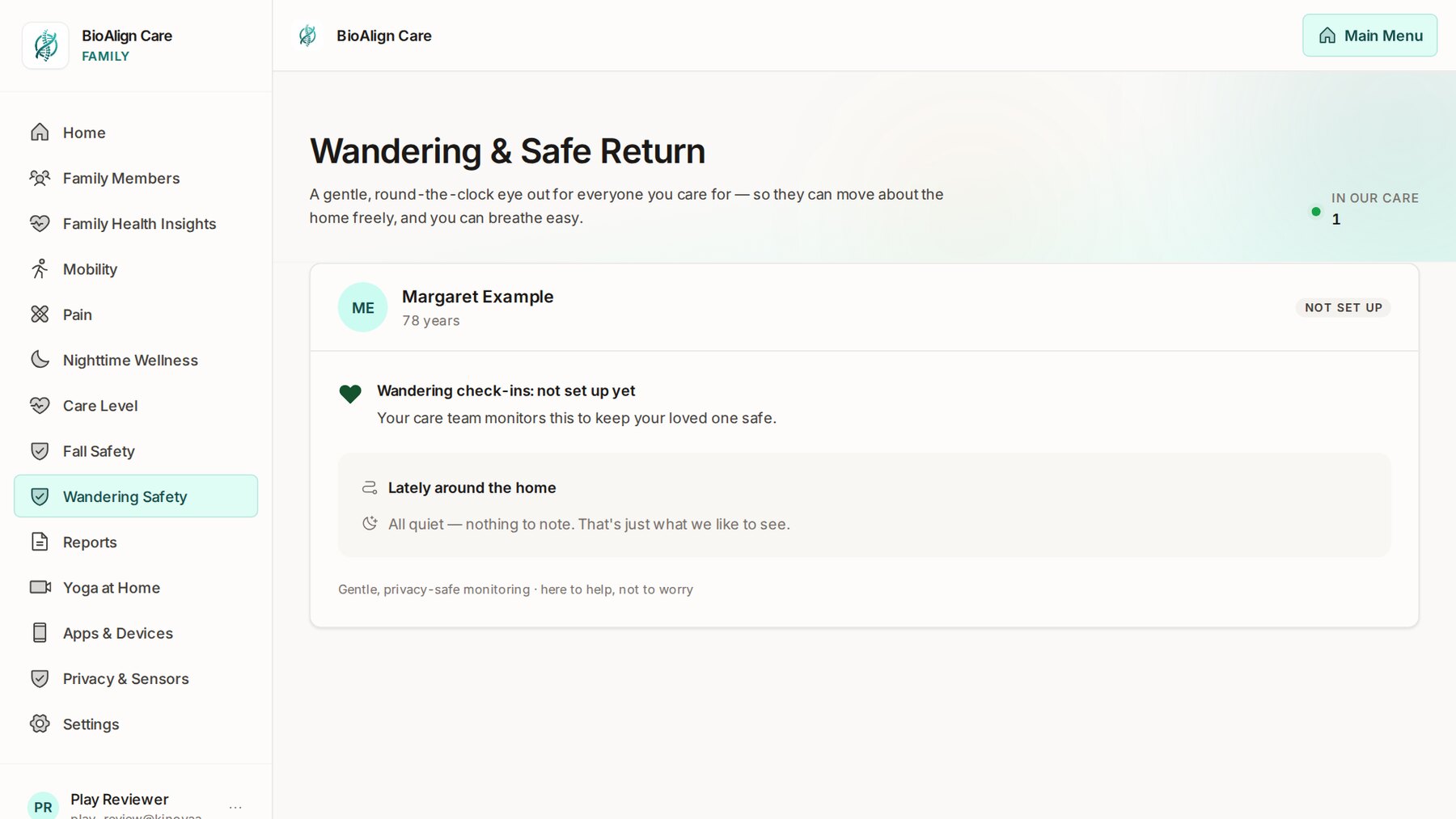
For a parent who may wander, the tablet keeps a gentle, round-the-clock eye out so they can move about the home freely. Fit the optional Bluetooth door and window sensors to the outside doors, and if one opens during the household's night hours the family is alerted. For someone with a sleep sensor, only while they're out of bed, so a door opened by someone else doesn't raise a false alarm.

The Wandering screen shows what's happened lately around the home. Most days it says exactly what you want to read: all quiet.

  • Bluetooth door and window sensors on the outside doors (optional)
  • Night hours only, set for your household
  • Talks straight to the tablet — no other app needed
Wandering and Safe Return: wandering check-ins and what's happened lately around the home
Your family, your routine

Everyone you care for, in one household.

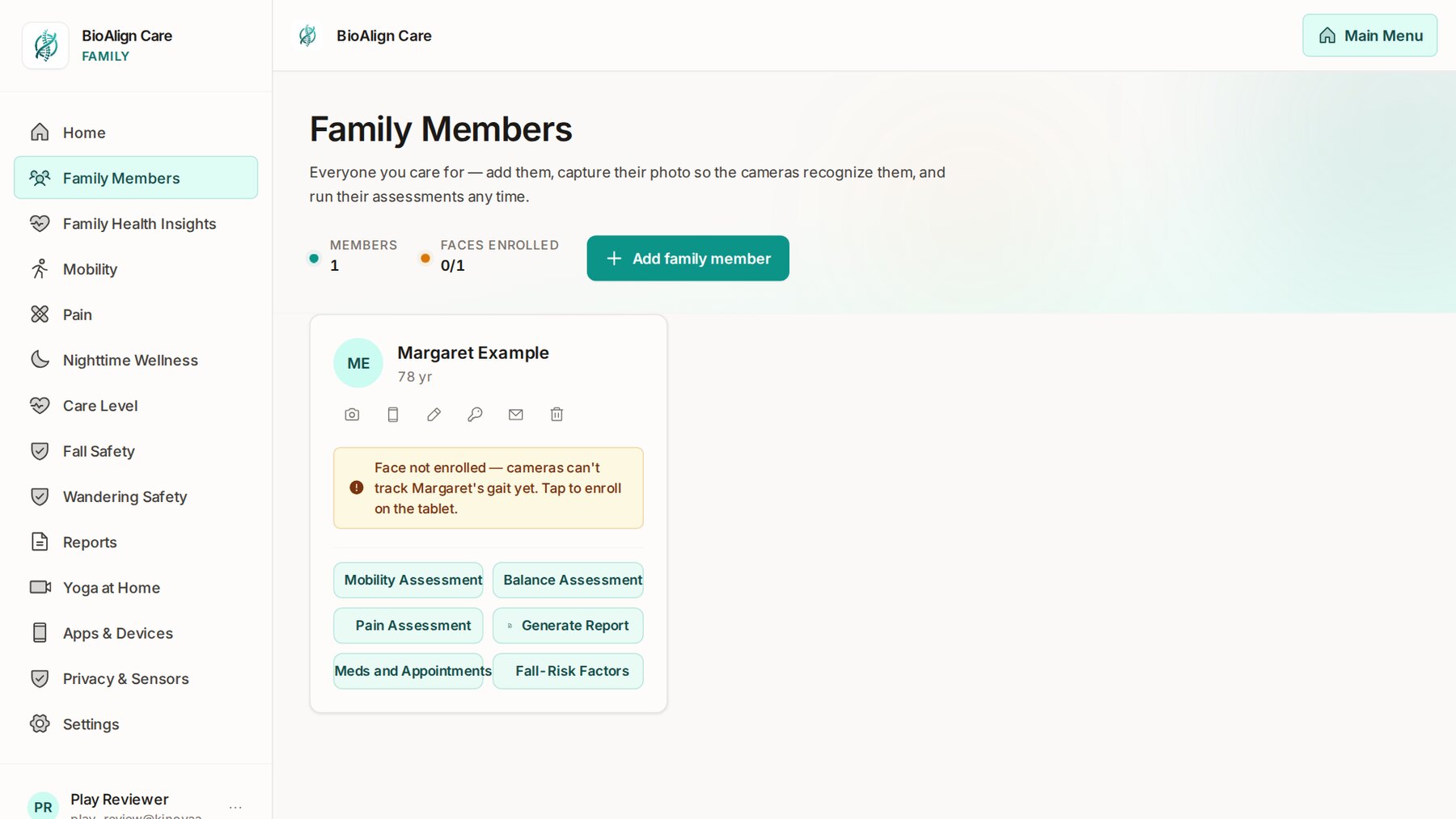
Add each person you care for, and enrol their face on the tablet so the cameras recognise them and follow their own walking and balance. From each person's card you can run a mobility, balance or pain check, look at their fall-risk factors, generate a report, and manage their medications and appointments.

Medications and appointments become reminders on the senior's own app, in large type, with a simple "I took it" tap. If a medication isn't marked as taken, the family knows. Bluetooth health devices — blood-pressure cuffs, scales, pulse oximeters, thermometers and more — send their readings to the right person automatically.

  • Up to six tablets per household, one per room
  • Reminders with an "I took it" tap, and missed-medication alerts
  • Mobility, balance and pain checks, and reports to share
Family Members: each person with face enrolment and mobility, balance, pain, report, medication and fall-risk options
Privacy

Safety without surveillance.

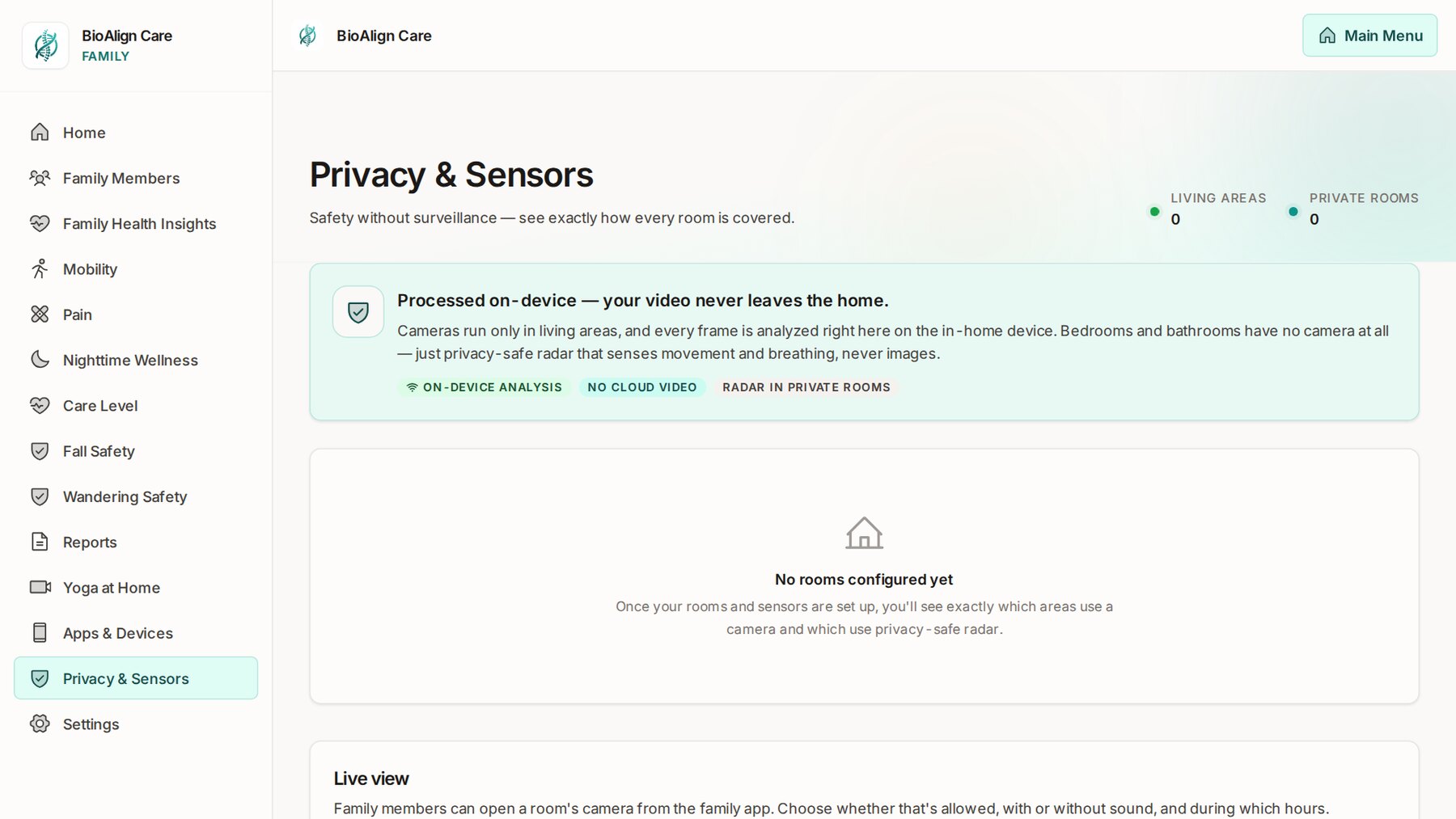
Cameras are used only in living areas, and the tablet does its watching right there in the home. Bedrooms and bathrooms never have a camera — just radar, which senses movement and breathing but never takes an image. The Privacy & Sensors screen shows exactly how every room is covered.

Your data is never sold.

You decide whether family members may open the live camera at all, with or without sound, and during which hours. Whenever someone is watching, the tablet shows it.

Privacy and Sensors: processed on the device, radar in private rooms, live view settings
The BioAlign Care At Home tablet and sensors

Why wearables aren't enough

A help button only works if it's being worn, and if someone can press it. Too often, neither happens.

18%

Only 18% of people with a medical alert button wear it all the time. 64% take it off to shower.

80%

In a study of people over 90, 80% of those who had an alarm and fell when alone did not use it to call for help.

BioAlign Care At Home works without anyone wearing or pressing anything. It watches for falls on its own, day and night. (An optional SOS button is there for anyone who wants one.)

Sources: The Senior List, Medical Alert Device Consumer Usage Study (2026); Fleming & Brayne, BMJ (2008).

BioAlign Care started with my own family. Read why I built it →

Questions

Will my parent accept it?

There's nothing to wear and nothing to charge, and no camera ever goes in a bedroom or bathroom. The tablet always shows when someone is watching, and you decide together who in the family can look in. Many families find it easiest to look at the live demo together first.

Is there a camera in the bedroom or bathroom?

No. Those rooms use radar, which senses movement and breathing but never takes an image. Cameras are only used in living areas. Video is never uploaded to us; a short clip of a fall is kept, encrypted, on the tablet itself. And your data is never sold.

What if they don't like technology?

They don't have to use it. It works in the background. The most they'll ever tap is a big Help button or an "I took it" button for medication reminders. Everything else is for the family.

What happens when it detects a fall?

Every family member gets an urgent alert on their phone right away. If nobody answers "I'm OK" on the tablet within a minute, the family is alerted again. It's a wellness and safety service, not an emergency service, so in an emergency always call 911.

How do I cancel?

Any time, in Settings. No contract and no phone call needed.

Yoga at Home, from a real yoga studio

Add live classes for $10 a month.

Add Yoga at Home and your loved one can join 17 live classes a week right from home, taught by our partner studio, GrassROOTS Wellness in Fresno: Gentle Chair Yoga, Balance & Mobility, Senior Wellness and more. The teachers focus on aging and mobility, and they include C-IAYT certified yoga therapists. Everything works from a chair, and there's an on-demand library for any time of day.

Want more help? Book a 1:1 private session with an instructor or yoga therapist, right in the class app. It's personal attention for balance, mobility, and aches and stiffness.

Why it matters

  • Balance and strength exercise lowered the rate of falls by 24% in older adults living at home (Cochrane review, 108 studies).
  • Yoga eases back pain. The American College of Physicians recommends yoga as a first treatment for chronic low back pain (2017), and in a large study it helped as much as physical therapy (Annals of Internal Medicine, 2017).
  • Chair yoga eased arthritis pain in older adults, and the relief lasted about three months after the program ended (NIH-funded study, J Am Geriatr Soc 2017).
  • Yoga improves balance, flexibility, sleep and mood in older adults (Int J Behav Nutr Phys Act 2019).
  • People who walk faster live longer: each small gain in walking speed was linked to 12% lower mortality in adults 65+ (JAMA 2011).

BioAlign tracks walking and balance over time, so your family can see the progress.

On every phone

A simple app for them. A watchful one for you.

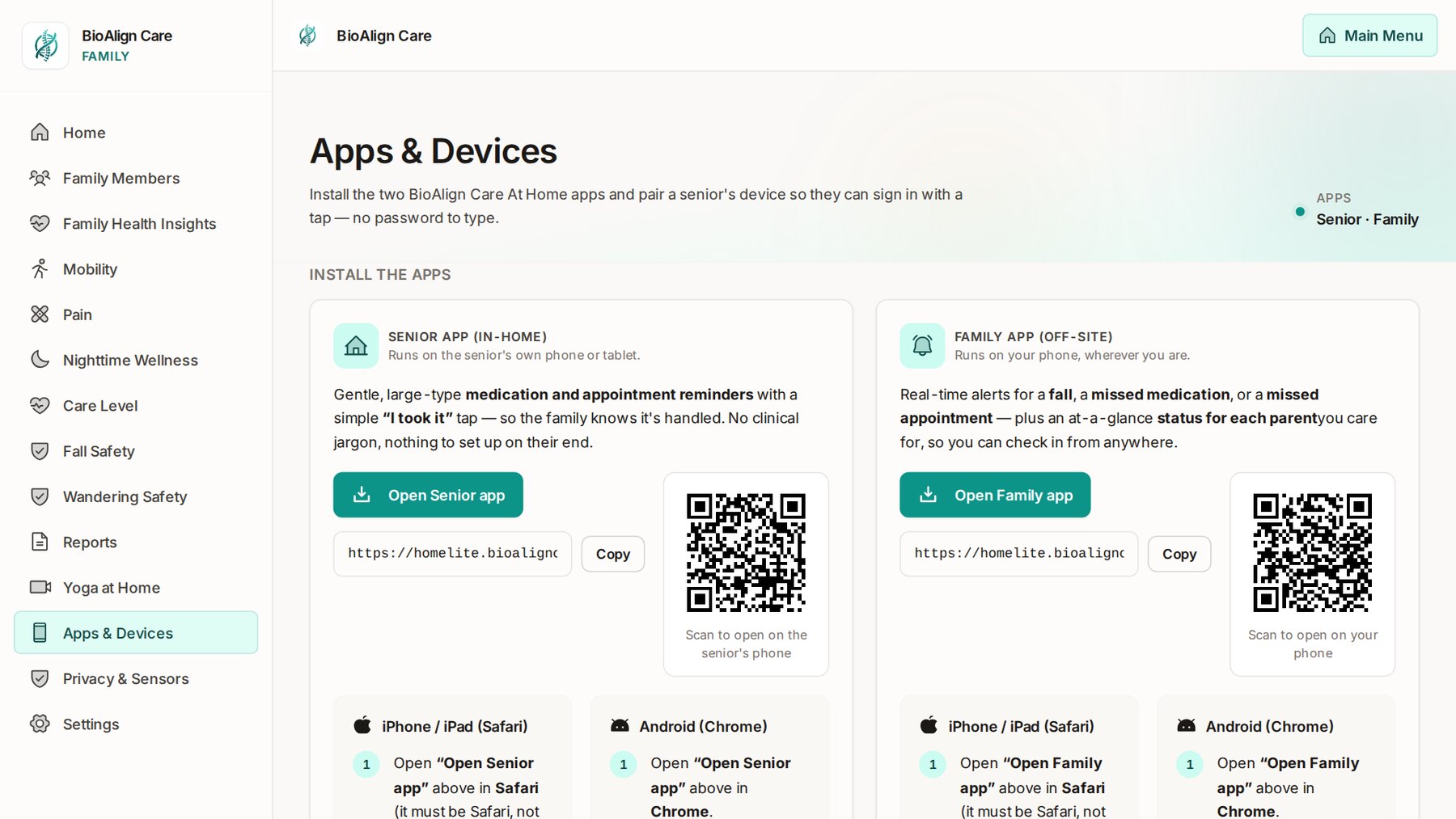
Two apps come with every household. The senior app runs on their own phone or tablet: large type, their reminders, and an "I took it" tap — nothing to set up on their end, and they sign in with a tap, no password to type. The family app runs on your phone wherever you are, with real-time alerts and an at-a-glance status for each person you care for.

Installing them is a link or a QR code from the Apps & Devices screen, on iPhone, iPad or Android.

Apps and Devices: the senior app and the family app, each with a link and QR code
What you need

An Android device and your home Wi-Fi. Sensors when you want more.

The system works with just an Android device — a tablet, or even an old Android phone. Radar sensors are optional: they extend fall detection to bedrooms and bathrooms and add sleep monitoring in bed. Buy everything ready to go from our store, or use your own Android tablet.

Required

Android device (iOS coming soon)Tablet preferred · the system runs on it alone
A 64-bit Android device running Android 10 or newer, with a front camera and Google Play Services. A tablet is preferred for its big, easy-to-read screen, but the system runs great on an Android phone too — a good use for an old one. That's all the system needs to work: it stands in the room on its charger, and its camera watches for falls and follows walking and balance. Without radar sensors, fall detection and gait monitoring cover the areas the tablet's camera can see. Link up to 6 tablets together to extend the system into more rooms. Use a charger strong enough to keep the tablet charging with the camera running.
Home Wi-Fi
The tablet joins your home Wi-Fi.
Family phones
Each family member's phone, for the family app and its alerts. iPhone or Android.

Optional

Fall sensorCeiling radar
A small radar on the ceiling that extends fall detection to rooms the camera doesn't see, such as bedrooms and bathrooms, where there's never a camera. In a tablet's own room, fitted inside the camera's view, it also tells the tablet when someone is there.
Sleep sensorRadar over the bed
Adds sleep monitoring in bed: one person's sleep, breathing and heart rate through the night, and the alert if they're out of bed too long at night.
Sensor power
Each radar sensor is powered over USB from a plug-in adapter and stays plugged in, and joins your home Wi-Fi on 2.4 GHz.
Wearable SOS buttonWrist or pendant
A Bluetooth button they wear. One press is the same as tapping Help: the family is alerted at once, and in the daytime the tablets in the home chime and show it. The family is also told if its battery runs low or the tablets stop hearing it.
Bluetooth door and window sensors
For someone who may wander at night. A small sensor and magnet on each outside door; it talks straight to the tablet over Bluetooth, with no other app.
Bluetooth health devices
Blood-pressure cuffs, scales, pulse oximeters, thermometers, glucose meters and heart-rate straps. Pair one on the tablet and its readings go to the right person.
Virtual SitterSet up in Settings
A trained sitter from a sitter company watches over your loved one remotely, through the tablet's live camera, on the days and hours you choose — overnight, for example. You pick the company, who they watch and when; sitters can only watch inside those hours, they see the home's alerts while they're on, and the tablet always shows when a sitter is watching. End the service any time and their access stops at once.
Yoga at Home$10 a month
Live and on-demand online yoga classes for the household, added to your plan.
Easiest

A ready-to-go package

A tablet with the app already installed, plus the fall and sleep sensors, from our store. Open the box, plug everything in, and follow the setup on the tablet's screen.

Shop packages

Use your own Android tablet

Download the app onto your tablet from this page, and get the sensors and any extras from our store. Android will ask you to allow the install from your browser: tap Allow, then open the app and sign up. The install guide walks through every step.

Price
$39.95 / month

Per household — every tablet, sensor and family member included. Add Yoga at Home, live classes from a real yoga studio, for $10 a month.

14-day free trial

How the free trial works

  1. Sign up in the app and add your card. Square, our payment processor, checks the card is good. Nothing is charged.
  2. Use everything free for 14 days — every feature, every family member.
  3. On day 15 your monthly subscription begins, charged to that card each month. Cancel any time.
Want to cancel during your free trial? Email support@kinovaai.tech before day 15 and your card won't be charged.
Stay in touch

Get updates from BioAlign Care At Home.

News, tips for caring for a parent at home, and new features as they arrive. A few emails a month at most, and you can unsubscribe any time.

We'll email you a link to confirm. See our privacy policy.